Helping Optical Industry Visualise an AI-Enabled Ecosystem

Helping Optical Industry Visualise an AI-Enabled Ecosystem Nov 18th |…
Felix PhaseOctober 5, 2026







A lens lab promises a progressive order for Thursday. The prescription arrived as a handwritten scan and was retyped into the lab system with the fitting height left blank. The job sits idle at intake while staff phone the practice. Meanwhile, last week’s remake on the same account sits in a spreadsheet logged as “redo, wrong,” with no note of what actually failed. By Friday, the practice calls to ask where the glasses are, and nobody knows, because the job’s history is spread across paper, email and unlinked spreadsheets.
Many labs now look at AI-enabled systems to fix breakdowns like these: tools that predict delays, flag risky orders or forecast demand. Those tools can help, but only when the data behind each job is complete and connected.
Most lens lab losses, whether remakes, missed promise dates or downtime, are data problems before they become bench problems. Custom-built AI agents can catch these risks early and alert supervisors while there is still time to act, but only when it can read connected order, production and quality data. In most labs, three gaps stand in the way:
The first step isn’t replacing your core systems. It is integration: linking order, production and quality data to a single job record. We see the same pattern across smarter workflows in optical operations more broadly. Once that foundation is in place, AI has something reliable to learn from, and your lab management software keeps running production.
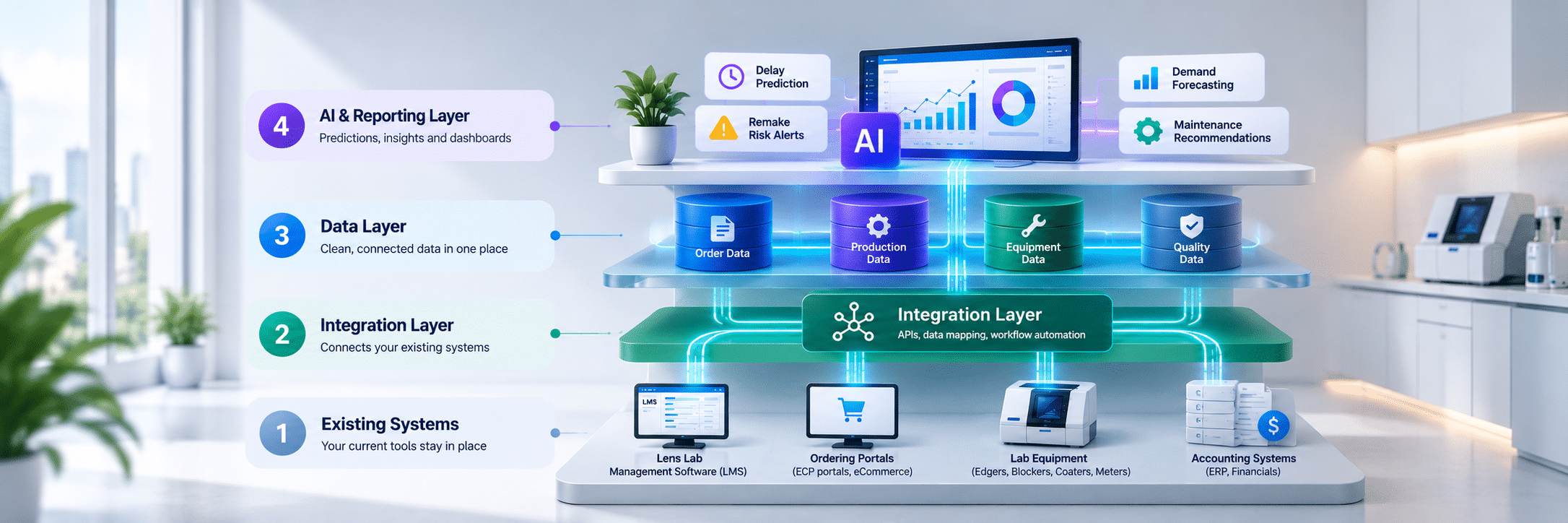
In practice, a connected lab has four layers that sit on top of each other. We call this the Connected Lab Stack. The details vary from lab to lab, but the pattern works for independent labs, wholesale labs and in-house finishing labs inside retail chains.
| Layer | What it includes | What it does |
|---|---|---|
| Existing systems | Lab management system, ordering portals, practice systems, equipment, accounting or ERP | Run daily work, as they do today |
| Integration layer | APIs, EDI, vendor interfaces, middleware | Moves data between systems and onto one job record |
| Data layer | A reporting database or data warehouse | Stores clean, connected history |
| AI and reporting layer | Models, alerts, dashboards | Predicts, flags and explains |
Two terms deserve a plain-English note. An API is a defined way for one system to request data from another or send data to it. Middleware acts as a bridge between systems that cannot talk to each other directly, which matters when older equipment only drops files in its own format.
Lab equipment adds one more piece. Much of it exchanges job and frame-shape data through the Data Communication Standard maintained by The Vision Council. Newer machines often connect directly. Older ones may need middleware to translate their files.
With this setup, the lab keeps the systems that already work and gains one connected view of every job, which is exactly what AI for optical labs needs.
Once data is connected, AI for optical labs can support decisions across the whole operation. Each use case below needs specific data and should be judged by a clear business result.
Data needed: order fields such as sphere, cylinder, axis, add power, prism, pupillary distance, fitting height and frame measurements, plus a history of past order errors.
What the AI does: business rules catch known problems, such as a progressive order with no add power. AI-assisted anomaly detection adds a second check by flagging orders that look unusual compared with past orders from the same account.
Business gain: fewer bad orders reach the bench, so fewer blanks and coating runs are wasted. It also protects compliance, because finished lenses must pass the checks of the market they ship to. In the U.S., that means FDA impact-resistance rules under 21 CFR 801.410 and the ANSI Z80.1 tolerance standard. In the UK and EU, labs work to ISO 21987 for mounted lenses, and spectacle lenses are regulated as medical devices. In GCC markets, each national regulator sets its own requirements. Catching errors at intake means fewer jobs fail those final checks, wherever the lab ships.
Data needed: remake history with consistent reason codes, linked to job details such as lens design, material, coating, machine, operator and account.
What the AI does: it finds patterns linked to higher remake risk. One example is a coating that fails more often on a particular material. Another is a machine whose sizing errors are slowly rising.
Business gain: supervisors can check high-risk jobs earlier and fix root causes before the same remake repeats next month.
Data needed: stage scans with timestamps, historical time per stage, queue depth, machine availability and promised dates.
What the AI does: it estimates which jobs are at risk of missing their date while there is still time to act.
Business gain: customer service can warn practices early, and supervisors can move work around before the delay happens.
Demand and Capacity Forecasting
Data needed: order history by product and account, seasonal patterns and product mix.
What the AI does: it forecasts upcoming volume by product type. Many labs see predictable peaks around back-to-school season and the end of the vision-benefits year, and a model can plan for them using past patterns.
Business gain: better staffing plans and fewer consumable stockouts during peak weeks.
| Existing data | AI capability | Business value |
|---|---|---|
| Order history | Anomaly detection | Fewer preventable errors |
| Production stage data | Delay prediction | Better promised-date accuracy |
| Equipment history | Predictive maintenance | Less unexpected downtime |
| Consumable usage | Demand forecasting | Fewer stockouts |
| Remake history | Remake history | Better root-cause identification |
Every AI for optical labs use case should support human judgment. A supervisor still decides what to do with a flagged job, and that review is also how the lab checks whether the model is getting things right.
What This Looks Like in Practice: One Lab, Four Data Sources
Illustrative scenario of a use case based on the wholesale lab setup.
Picture a wholesale lab shipping a few hundred jobs a day. Orders come in through an online portal and by email. Its lab management system records stage scans. Edger maintenance lives in a paper log, and remakes are tracked in a spreadsheet with free-text reasons.
A sensible first project has three phases:
The lab measures three things: on-time rate against promised dates, remakes by reason code, and how many flagged jobs would actually have been late. If the pilot works, remake prediction is the natural second use case, because the coded remake history already exists.
For many labs, the answers point to the same starting point. Connect intake and stage data first, then add one AI use case and measure the result before expanding.
Technovate.One is a technology engineering, integration and AI partner focused on the optical industry. For more than a decade, we have worked with optical retail chains, OD practices, lens labs, eyewear manufacturers and optical SaaS platforms. For lens labs, that means connecting lab management systems to ERP, routing lab orders and tracking production from intake to dispatch. Our work usually covers five areas.
We connect your lab management system with the PMS systems that send you orders, your lab equipment, and your supply chain and ERP platforms. Our Lab Order Routing Layer, a pre-built blueprint, handles order routing, production tracking and status write-back to practices, so they can see where a job is without picking up the phone. Each connection uses the mix of APIs, EDI, vendor interfaces and middleware it needs. Production integrations include Frames Data, Lens Data, UPS and Microsoft Dynamics 365 Business Central on the supply side, and Eyefinity, RevolutionEHR, Compulink, Ocuco Acuitas and Optix on the practice side. More detail
Start by mapping where your order, production, equipment and quality data live today.
In most cases, yes. AI for optical labs usually runs beside the lab system and reads its data through APIs, database access or scheduled exports. The lab system keeps running production as it does today.
Industry benchmarks put the average at about 15% of spectacle lens orders, and well-managed operations hold it near 5%. Most remakes come from measurement and transcription errors, which better order data and intake validation can catch.
A first use case usually takes about three months: roughly a month to map and code the data, four to six weeks to connect systems, and a pilot running alongside the current process. Measurable results from the first integrations typically show within 60 to 90 days.
Usually not. Replacement is only needed if the system cannot record or share the data AI depends on, such as stage-level status. Check that first.
It depends on the use case. Most need order details, stage scans with timestamps, remake reasons, equipment logs and consumable usage, all linked by job number. Consistency matters more than volume. A smaller set of clean, coded records is more useful than years of free-text notes.
It can identify patterns linked to higher remake risk, as long as remake reasons are recorded with consistent codes and linked to job details. The model flags risk. People still decide what to do about it.
Yes, when stage scans, historical stage times, queue depth and machine status are connected. Without stage-level tracking, delay prediction has very little to work with.
AI does not connect systems by itself. Integration does that, using APIs, EDI, vendor interfaces and middleware. AI then works on the connected data.
The safest way to introduce AI for optical labs is to start with one use case and run it alongside your current process. Let supervisors review its recommendations before anything is automated. Expand once the results are measured.
AI for optical labs can reduce remakes, delays and downtime. It works best when order, production, equipment and quality data are linked to the same job record. Labs that start there get useful predictions. Labs that skip that step get guesses